 DoudouLinux
The computer they prefer!
DoudouLinux
The computer they prefer!
The site's languages [ar] [cs] [de] [en] [es] [fa] [fr] [it] [ms] [nl] [pt] [pt_br] [ro] [ru] [sr] [sr@latin] [th] [uk] [vi] [zh]

Installing DoudouLinux definitively
November 2010 — last update October 2013All the versions of this article: [čeština] [English] [français] [Bahasa Malaysia] [română] [русский]
People frequently ask for the possibility to definitively install DoudouLinux onto a computer which would then be dedicated to children. Since DoudouLinux 2.0, a real installer is provided so that you can either wipe your entire disk to install DoudouLinux alone or instead make room on disk to install DoudouLinux along with another computer system that is already installed (multi boot); however, please remember that one of the primary goals of DoudouLinux is to allow children to use the computer without the risk of damaging data stored in the machine. This is why installing DoudouLinux will never be possible with a single mouse click…
Article table of contents
Why installing DoudouLinux?
First of all, DoudouLinux is designed to be risk free, providing high security, whatever the computer that it runs on is - no data will not be modified. However, if you wish to provide your children with a dedicated computer, if you want to better customize DoudouLinux for your country (language, timezone, keyboard) or if you want to install additional software in DoudouLinux, it is more interesting to install DoudouLinux onto the computer hard drive.
Secondly, the system will start faster, there will not be the risk to mislay the CD support or the USB key anymore, nor the noise produced by CD rotation. Moreover there will not be the issue of data persistence anymore since data will be actually written onto disk as soon as they are modified.
Finally, the installation tool changes administration rights of the DoudouLinux system. Instead of letting full administration rights to the activity “Whole DoudouLinux”, a user administrator of the machine will be created during the installation. This user will get the full administration rights while the activity “Whole DoudouLinux” will get only very reduced administration rights, to install printers for example. The security of the system is then even enhanced in the end.
How to install DoudouLinux definitively?
So yes, DoudouLinux can be installed but not by clicking on the mouse buttons only and not by choosing an “Install” option of some application menu neither. However the installation process which is currently available is designed to be simple: you just have to make the very mandatory choices, except if you want to perform multiboot.
Important notice: the installation tool does not propose to save any data. It may be a good idea to make a backup before proceeding to a multiboot installation.
Installation process
The installation process is the following:
- Start the computer with DoudouLinux, using the CD or the USB key.
- Enter the activity “Whole DoudouLinux”.
- Open the console.
- Type the command to run the installation tool.
- Answer questions then launch the installation.
- Restart the computer without the DoudouLinux USB key (or the CD) in order to test your fresh installation.
The installer is using the Live media to create the system onto disk, no additional media is required. The console can be found in the “Work” tab, “Tools” group, “LxTerminal” icon. Another possibility is to use the key shortcut mapped to the console and simultaneously press the Logo and the T keys [1]. The command to type in the console is the following:
sudo live-installer
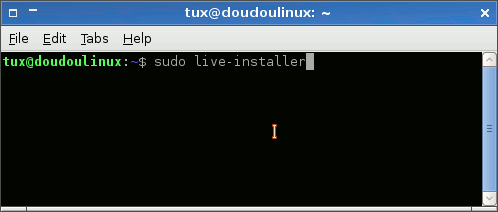
- Launching the DoudouLinux installer
A series of settings pages will then be displayed, they are detailed below. The installation process itself is lasting around 5 to 10 minutes depending on hardware performances and type of Live media (CD or USB device). At the end of the installation, you will be proposed to restart your machine and enjoy!
System requirements
System requirements are quite similar to those needed to make the LiveCD run. You need a machine with:
- an Intel-like processor (Pentium® II or higher recommended, or equivalent)
- 256 MB RAM memory
- 4 GB of disk space
- a 800×600 dots display
However it is possible to make DoudouLinux run on slower processors, with less RAM memory, with less disk space (3 GB is the real minimum) and a smaller display resolution, but some applications may not run smoothly or may not run at all.
The installer settings pages
The installer lets you set the following parameters:
- System language
- Timezone
- Keyboard layout and model
- Main user account, with administration privileges
- Selection of the disk to install onto
- Selection of disk partitions or automatic partitioning
- Manual repartitioning if needed
- Hardware clock set to UTC or not
- Boot program installation
All of that is performed from within a nice graphic interface as you can see below on the screenshots. A disk wizard mode is available for people who want to entirely wipe their disk but do not want to bother with designing partitions. In this case, once the disk is selected (step 6), it is automatically repartitioned into three partitions [2]: root, home and swap. Unlike many automatic partitioning tools, we want users to be able to reinstall their system without loosing their data! [3] Now let’s look at the installer settings more deeply.
System localization
The first three settings pages are similar to the DoudouLinux tools used for the corresponding tasks. Please browse their documentation page for more information:
Important notice: although the installer is proposing all the possible languages, only the languages available on the CD are really available and you should not select a language that is not a variant of the CD language if you do not want to get an English system in the end. Read the page Language setting to know more about the languages that are really available on each CD.
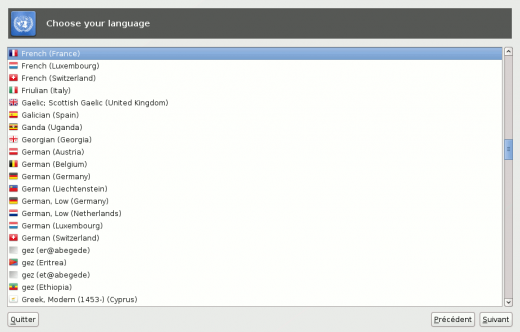
- Selection of system language
- As of writing, you should select a language that is a variant of the CD language if you do not want to end with an English system.
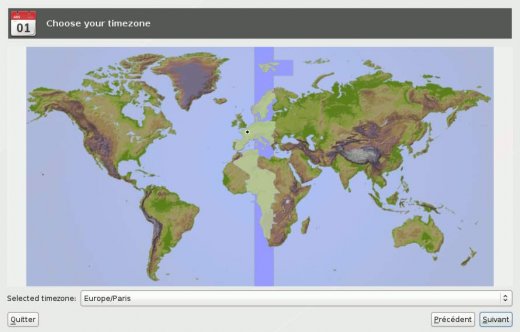
- Selection of system timezone
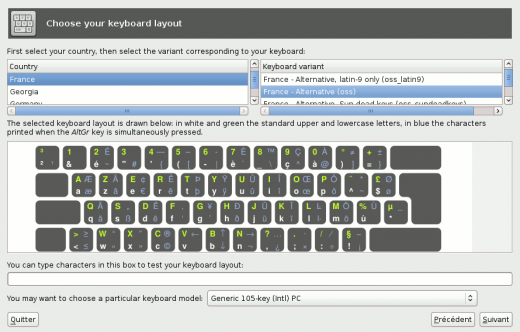
- Selection of keyboard layout
User with administration rights
Next, the main user settings page requires you to fill the following information:
- User picture, can be your photo, it’s purely informative and is quite useless inside DoudouLinux.
- User real name (full name), informative too indeed.
- User identifier (username), the nickname the user with administration rights will use to login. You have to use the ASCII characters only [4] and space characters are not allowed.
- User password. There is no constraint on password complexity but, if you really want to keep the administration rights for you, try to use a non trivial password! Take care of your current keyboard layout before typing if you had to change it for your name.
- Network machine name (hostname), the name the machine will use on the network, try to use different names if you have several machines on your local network. Internet is not concerned by this setting in any way.
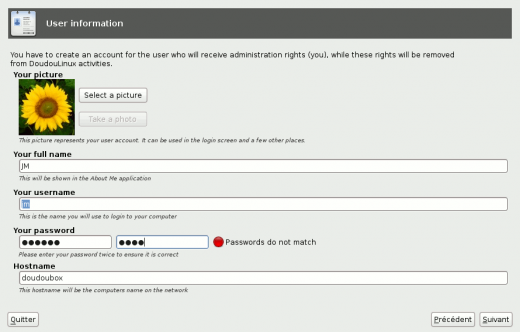
- Settings for the user with administration rights
Target disk and partitions
Then the disk selection settings page is proposed only if more than one usable disk is found in your computer. Disks can be internal disks or external disks like USB keys, flash cards or USB disks indifferently. However disks are ignored if they have a total storage space lower than the minimum required to install DoudouLinux.
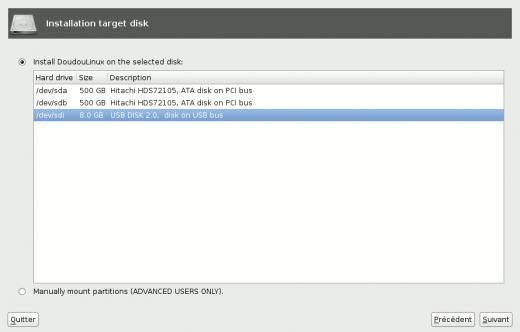
- Selection of the target disk
Once the target disk is selected, you have to select the partitions onto which DoudouLinux will be installed. As indicated above, either you let the installer compute new partitions, which means you agree to destroy all the data on your disk, or you perform partition selection manually, in which case you can decide to reduce the size of some partitions to make room for DoudouLinux. Note that selecting automatic partitioning will immediately destroy all the disk data after validation even if you abort the process before launching the installation. This is why two confirmation windows will be displayed before really accepting this choice.
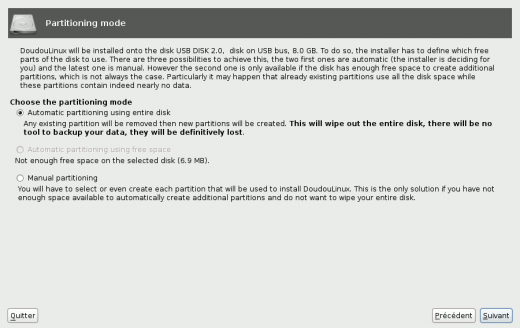
- Selection of partioning mode
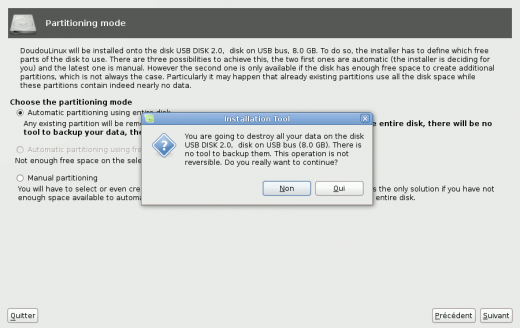
- Confirming automatic partitioning would immediately destroy all the disk data
When selecting partitions manually, you are free to use as many partitions as you want to install DoudouLinux. The installer shows you the list of available partitions. If you are not satisfied with them, you can click the button “Edit partitions” to start a repartitioning tool called GParted and change them as needed: shrinking, moving, deleting, adding, etc. If you changed the partitions with GParted, you then need to tell the installer to reload the partition map by clicking the button “Update”. Clicking on a partition with the right mouse button will show you a small menu that makes faster the selection of the most frequently used partitions: root, home and swap (NB: root is absolutely mandatory). Note that if the installer detects an existing Linux swap partition on your disk, it will be automatically assigned to the swap.
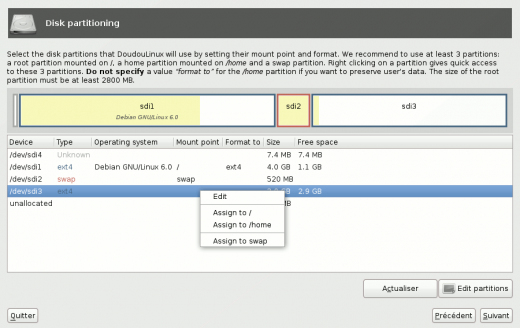
- Manual selection of target partitions
Other settings
The two latest parameters to set before proceeding to the installation are the UTC clock option and the installation of the boot program Grub. The role of the UTC clock option is explained in detail on the page Date, time and timezone. In short, if the clock is wrong of several hours, try to toggle this option and see if you get the correct time or not. If not, read the mentioned page to decide what setting seems to better match your situation. Concerning Grub, if you are installing DoudouLinux alone or along with Windows® (dual boot), you should activate its installation. If you are installing DoudouLinux along with other computer systems, you will probably prefer keep your existing boot program and update its configuration from within another system already installed onto the machine.
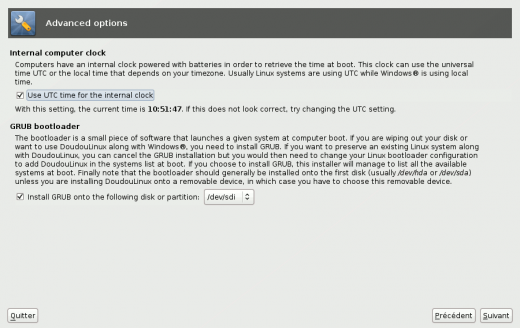
- UTC hardware clock and boot program settings
Summary page
You are now ready to launch the installation of DoudouLinux. A summary page is displayed to let you check that you have correctly answered all the questions. Once the installation is launched, its progress is continuously reported in the installer window while a welcoming slideshow is displayed. Finally the installer will propose you to reboot the machine.
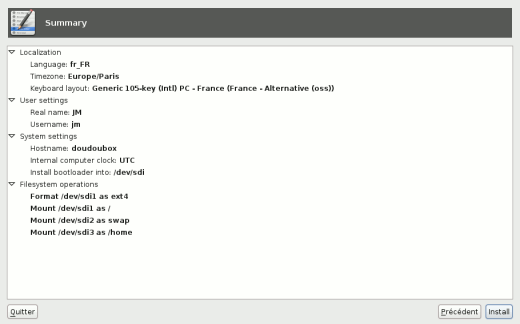
- Summary of the installation
Additional informations
What does the installer do?
For curious people, the installation tool does several operations:
- It copies all the files from live media onto hard disk.
- It removes softwares that are specific to a live system.
- It configures the system as requested by the user.
In the end, the final Linux system behaves exactly as if it was installed from scratch and you get access to the full software library of Debian Linux. Note that softwares are not updated to their latest version during the installation process, even if you have a working Internet connection. This choice was made taking into account the fact that not every people on earth can install DoudouLinux on a machine connected to the Internet.
Limitations of the installer
- The installer cannot perform data backup for you before proceeding. You must use third party softwares to do so.
- The installer is not able to use the available free disk space for automatic partitioning. You have to switch to manual partitioning.
- The installer is only available for Intel-like Pentium® II processors or more recent ones, because the LiveCD is built for this architecture. If you want to install DoudouLinux on older computers, you need to download a build specific to 486 processors from our DailyBuild section.
- The installer cannot install a 64 bits system, only a 32 bits one, still because our LiveCD is built for this architecture. However 64 bits processors can run a 32 bits system while the reverse is not true.
- The installer is not able to manage advanced partitioning techniques like LVM or RAID. LVM provides virtual disk partitions for easier partition management, and RAID provides data redundancy on disks to avoid data loss. If you are interested in using such techniques, you must install DoudouLinux starting from a Debian system.
Installing new software
Once DoudouLinux has been installed, it is possible to permanently install new software since it is a standard Linux installation. As the official Debian Linux package repositories are included in DoudouLinux, you have access to the huge number of Debian packages, more than 20,000 for DoudouLinux 2.0 Hyperborea. Nevertheless, no graphical package manager is installed so that, as long as you have not installed such package manager, operations must be performed from the command line. Basically, you have to type the following commands in the console:
$ sudo apt-get update
$ sudo apt-get install name-of-package
Where name-of-package is the name of the package to be installed. Note however that all the softwares may not be automatically shown in the advanced activities because the application managing application launchers on the desktop is using rules to determine which icon to show or not. In this case, you would have to edit the XML configuration file $HOME/.config/lxlauncher/launcher.menu.
System updates
If you wish to install software updates once the system is installed, this is currently only possible from the command line because no graphical package manager is installed. Of course you can also decide to install such package manager (see above for the operation of installing new software). To upgrade your system from the command line, type the following commands in the console:
$ sudo apt-get update
$ sudo apt-get upgrade
Important notice: do not operate from a DoudouLinux activity when upgrading the system. Updates may try to update activities and fail if there is a running activity.
System upgrading
If you wish to upgrade from a previous version of DoudouLinux to a newer one, the upgrade process is currently not officially supported. Managing the upgrade process would require that we spend much time in writing and testing update scripts. We currently have no task force to achieve this. As a result the recommended way for upgrading is to backup user data and reinstall the new version. You may also want to try the official Debian upgrade process rather than reinstalling but this may sounds a bit complicated to many people and this is not described in this documentation.
Footnotes
[1] Logo is the key located on the bottom left side of the keyboard, generally between the Ctrl and the Alt keys.
[2] Except if the disk is too small for these three partitions, in which case a unique partition is created. This typically occurs on low end netbooks with 3-4 GB of disk space only.
[3] When reinstalling a new version of DoudouLinux, you will then just have to not reformat the home partition. Note however that DoudouLinux cannot manage system upgrading currently. Activities may not be correctly set if you upgrade with too different a version.
[4] ASCII characters are the Latin uppercase and lowercase letters, without any modifier like accents or cedilla: a-z and A-Z. If your language is using a non-Latin alphabet, you will have to switch of keyboard layout by pressing simultaneously the left Shift key and the left Alt key.
Documentation
-
Applications
-
Configuration
- Mouse setting
- Sound settings
- Screen settings
- Keyboard layout
- Date/time and time zone
- The Activities Menu
- Using a USB key or a USB hard disk
- Using a printer
- Language setting
- Using networking
- Creating a WiFi hotspot
-
Questions and issues
-
Advanced tools
- Preserving user privacy
- Parental controls
- Controlling computer use
- Data persistence
- Creating a DoudouLinux USB key
- Installing DoudouLinux definitively











 Copyright © DoudouLinux.org team - All texts from this site are published under the license
Creative Commons BY-SA
Copyright © DoudouLinux.org team - All texts from this site are published under the license
Creative Commons BY-SA

 RSS 2.0